
BEURSBUDDY
Frequently asked questions for exhibitors
Answers about orders, booth numbers, delivery, payment, PO references, design files and the BeursBuddy Media Player.
How BeursBuddy works
What is BeursBuddy?
BeursBuddy is a platform where exhibitors can choose additional items for their booth, including furniture, AV screens, plants, distinctive activations, printwork and much more.
We handle transport, setup and dismantling of these items, taking care of the logistics for exhibitors.
Can I get help choosing the right items?
Yes, of course!
Our team of event professionals is ready to help you equip your booth with everything you need.
Contact our team via 0348 688 003. We will help you choose the items that suit your needs and goals.
For which events can I use BeursBuddy?
BeursBuddy is available to exhibitors at a wide range of trade shows.
Check the ‘find your event’ page to see whether your event is connected to BeursBuddy. If your event is not listed, contact us via 0348 688 003 to discuss how we can help you.
How can I add my booth number?
Go to My events in your account and click the event you ordered for.
You can easily add your booth number here.
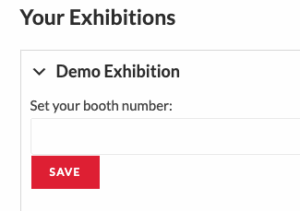
Enter your booth number and click “Save”.
How can I change my booth number?
Go to events in your account and click the event for which you want to change the booth number.
Click “Edit”, enter your booth number and then click “Save”.
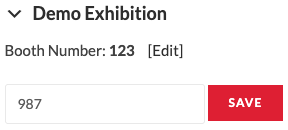
All orders for this event will then use the same booth number.
Orders
Until when can I order products for an event?
The order deadline varies by event and is often set by the event organizer.
You can generally order until one week before the event starts.
Some products, such as printwork, may have an earlier order deadline. You can also find this on the event page.
How can I order extra items for my booth?
To order on BeursBuddy, first create an account. Then log in and use your unique access code to enter the shop for the event where you are exhibiting.
Use our webshop to select the items you want, add them to your cart and place your order.
How will I receive the rented products?
We ensure that ordered items are delivered to your booth at the event venue on time and collected afterwards.
Do I pay delivery charges?
No, BeursBuddy does not charge extra to deliver your rented products to your booth. 😀
What happens if I want to change or cancel my order?
You can change or cancel your order up to a specified deadline.
Contact our customer service team as soon as possible via 0348 688 003 if you wish to change or cancel an order.
Invoicing and payment
My company is not based in the Netherlands… Why do I need to pay VAT?
When a Dutch company rents out or sells and supplies goods within the Netherlands to a customer located outside the Netherlands, the place of supply for VAT purposes is within the Netherlands. This means that Dutch VAT applies to this transaction. Therefore, the supplier (BeursBuddy) must charge Dutch VAT to the foreign customer.
This situation differs from export transactions where goods are transported to a country outside the Netherlands; in such cases, the 0% VAT rate may be applied. However, since the goods remain within the Netherlands, there is no export, and thus the 0% VAT rate does not apply.
It is important to note that the foreign customer may be eligible to reclaim the Dutch VAT paid (21%), depending on the regulations in your own country and any applicable tax treaties.
Which payment methods does BeursBuddy offer?
Paying on BeursBuddy is straightforward.
We currently support the following payment options:
- iDEAL (Netherlands)
- Credit Card: Visa, Mastercard, American Express, Discover & Diners Club
- SEPA Direct Debit
- Bancontact (Belgium)
- EPS (Austria)
- Przelewy24 (Poland)
- On account (click here for more information)
Conditions for ordering on account
We offer ordering on account to Dutch and Belgian entities, subject to a number of conditions.
Ordering on account is only available:
- For non-public events. (These events require an access code to enter the webshop.)
- If the event starts in at least 28 days
- If you have not previously paid an invoice to us late.
Important: If we have not received payment before the event starts, we will not deliver the products and services!
My company uses a procurement system. What should I do?
If your company uses its own procurement system, please read the information below carefully!
As the customer or purchaser, you are always personally responsible for entering invoices into your own procurement system when ordering our products or services on account.
Due to the volume of orders, BeursBuddy cannot do this for you. If this is nevertheless necessary for any reason, we charge an administration fee of €150.00 per invoice for this, regardless of the invoice amount.
How can I add a PO number to my order?
Go to “My Events” in your account and click the event you ordered for.
Then click the icon to add your PO number to the order.
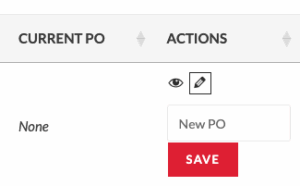
Enter your PO number and click “Save”.
You can use the icon to view your order and download the invoice showing your PO number.
Submitting artwork
How can I submit artwork for my products?
To upload files for printing on a product you have ordered, go to the “My events” page.
Open the event you ordered for, click the corresponding order and upload your file there.
You can no longer upload your design after the submission deadline!
Can I change a file I have already uploaded?
Yes, this is easy to do.
Upload your new design in the same way, against the correct product in the order. We will use the file you uploaded most recently.
You can no longer change your design after the submission deadline.
What are the artwork specifications?
Please keep the following points in mind when submitting artwork:
- We only accept PDF files
- Maximum 1 page per PDF file
- Make sure all text is converted to outlines
- Do not add crop marks or bleed to your design
- The file must be at least 150 DPI. (We recommend 300 DPI.)
BeursBuddy Media Player
Can I play PowerPoint presentations with the BeursBuddy Media Player?
To ensure your automated PowerPoint presentation plays continuously, we recommend exporting it as an MP4 file. You can then load it as a video.
Download the BeursBuddy Media Player user guide
Click here to download the BeursBuddy Media Player user guide.
Continue here
A look inside the event workspace
Exhibitor dashboard
An example of the actual interface with sample data. Available features depend on your event and role.